mirror of
https://github.com/chriskempson/base16-vim.git
synced 2026-11-25 15:14:30 +03:00
Adds extra troubleshooting info to readme.
This commit is contained in:
 Chris Kempson committed
1 parent
ea44fab22d
commit
c487397b66
1 file changed
+11
-1
@@ -40,4 +40,14 @@ If using a Base16 terminal theme designed to keep the 16 ANSI colors intact (a "
|
||||
This will cause vim to access the colours in the modified 256 colorpsace. Please **do not** enable this simply because you have a 256 color terminal as this will cause colors to be displayed incorrectly.
|
||||
|
||||
## Troubleshooting
|
||||
There is a script to help troubleshoot colour issues caled `colourtest` available in the https://github.com/chriskempson/base16-shell repository.
|
||||
There is a script to help troubleshoot colour issues caled `colourtest` available in the [Base16 Shell](https://github.com/chriskempson/base16-shell) repository.
|
||||
|
||||
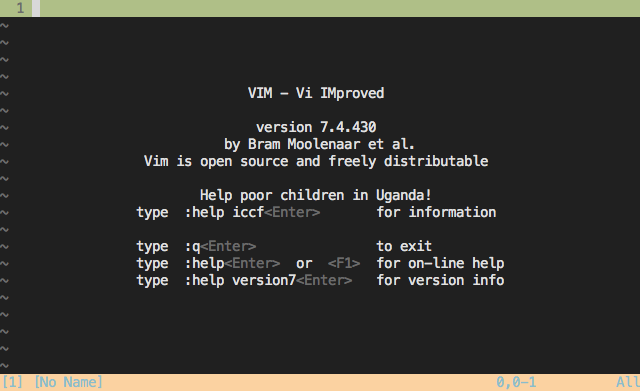
### Green line numbers
|
||||
|
||||
|
||||
If your Vim looks like the above image you are using a 256 terminal theme without setting `let base16colorspace=256` in your `~/.vimrc`. Either set `let base16colorspace=256` in your `~/.vimrc` or use a non 256 terminal theme.
|
||||
|
||||
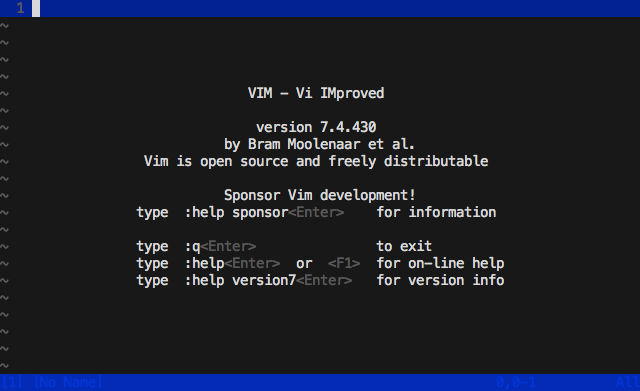
### Blue line numbers
|
||||
|
||||
|
||||
If your Vim looks like the above image you are setting `let base16colorspace=256` in your `~/.vimrc` but either not running [Base16 Shell](https://github.com/chriskempson/base16-shell) or [Base16 Shell](https://github.com/chriskempson/base16-shell) is not working for your terminal. Either ensure [Base16 Shell](https://github.com/chriskempson/base16-shell) is working by running the `colourtest` available in the [Base16 Shell](https://github.com/chriskempson/base16-shell) repository or not setting `let base16colorspace=256` in your `~/.vimrc`.
|
||||
Reference in new issue
Block a user