mirror of
https://github.com/chriskempson/base16-vim.git
synced 2026-11-26 07:33:08 +03:00

54 lines
2.9 KiB
Markdown
54 lines
2.9 KiB
Markdown
# Base16 Vim
|
|
See the [Base16 repository](https://github.com/chriskempson/base16) for more information.
|
|
This theme was built with [Base16 Builder](https://github.com/chriskempson/base16-builder).
|
|
|
|
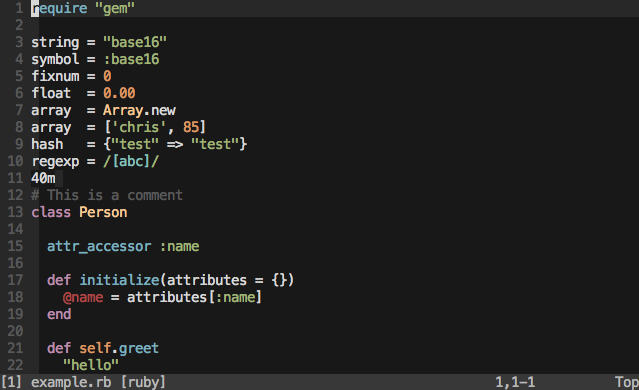
Supports graphical Vim and console Vim.
|
|
|
|
|
|
|
|
## Terminal Themes
|
|
For terminal Vim (non-gui) please ensure you are using a base16 terminal theme.
|
|
|
|
* [iTerm2](https://github.com/chriskempson/base16-iterm2)
|
|
|
|
## Installation
|
|
To use the dark theme ensure `set background=dark` is present in your `~/.vimrc` file. Otherwise Vim will use the light variation by default.
|
|
|
|
Add `colorscheme base16-default` to your `~/.vimrc`.
|
|
|
|
### Vundle
|
|
Add the following to your `~/.vimrc` file and run `PluginInstall` in Vim.
|
|
|
|
Plugin 'chriskempson/base16-vim'
|
|
|
|
### Pathogen
|
|
|
|
cd ~/.vim/bundle
|
|
git clone https://github.com/chriskempson/base16-vim.git
|
|
|
|
### Manual
|
|
|
|
cd ~/.vim/colors
|
|
git clone git://github.com/chriskempson/base16-vim.git base16
|
|
cp base16/colors/*.vim .
|
|
|
|
## 256 colorspace
|
|
If using a Base16 terminal theme designed to keep the 16 ANSI colors intact (a "256" variation) **and** have sucessfully modified your 256 colorspace with [base16-shell](https://github.com/chriskempson/base16-shell) you'll need to add the following to your `~/.vimrc` **before** the colorsheme declaration.
|
|
|
|
let base16colorspace=256 " Access colors present in 256 colorspace
|
|
|
|
This will cause vim to access the colours in the modified 256 colorspace. Please **do not** enable this simply because you have a 256 color terminal as this will cause colors to be displayed incorrectly.
|
|
|
|
## Troubleshooting
|
|
There is a script to help troubleshoot colour issues caled `colourtest` available in the [Base16 Shell](https://github.com/chriskempson/base16-shell) repository.
|
|
|
|
### Green line numbers
|
|
|
|
|
|
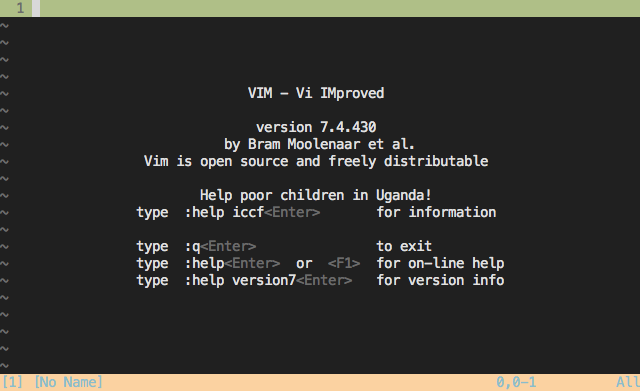
If your Vim looks like the above image you are using a 256 terminal theme without setting `let base16colorspace=256` in your `~/.vimrc`. Either set `let base16colorspace=256` in your `~/.vimrc` or use a non 256 terminal theme.
|
|
|
|
### Blue line numbers
|
|
|
|
|
|
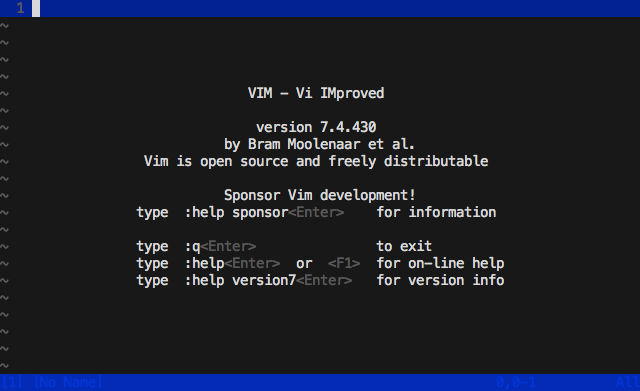
If your Vim looks like the above image you are setting `let base16colorspace=256` in your `~/.vimrc` but either not running [Base16 Shell](https://github.com/chriskempson/base16-shell) or [Base16 Shell](https://github.com/chriskempson/base16-shell) is not working for your terminal. Either ensure [Base16 Shell](https://github.com/chriskempson/base16-shell) is working by running the `colourtest` available in the [Base16 Shell](https://github.com/chriskempson/base16-shell) repository or not setting `let base16colorspace=256` in your `~/.vimrc`.
|