 Max Christian Pohle
d0e10c3ea3
The order in which the colors are getting set seems to play a role.

From :h cterm-colors:
<	When setting the "ctermbg" color for the Normal group, the
	'background' option will be adjusted automatically.  This causes the
	highlight groups that depend on 'background' to change!  This means
	you should set the colors for Normal first, before setting other
	colors.

In my case I had base16-tomorrow installed with airline and the whitespace warning of airline was hard to read. It turned out that this was the root cause for that: I had :set background=light before :colorscheme base16-tomorrow in my vimrc and :verbose set background? revealed, that base16-tomorrow.vim had reset it back to dark, even though it does not contain any set background-command.


Base16 Vim
See the Base16 repository for more information.
This theme was built with Base16 Builder.
Supports graphical Vim and console Vim.
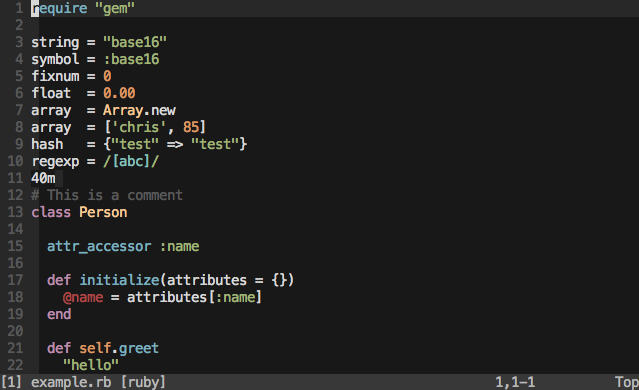
Terminal Themes
For terminal Vim (non-gui) please ensure you are using a base16 terminal theme.
Installation
Add colorscheme base16-default-dark to your ~/.vimrc.
Vundle
Add the following to your ~/.vimrc file and run PluginInstall in Vim.
Plugin 'chriskempson/base16-vim'
vim-plug
Add the following to your ~/.vimrc file and run PlugInstall in Vim.
Plug 'chriskempson/base16-vim'
Pathogen
cd ~/.vim/bundle
git clone https://github.com/chriskempson/base16-vim.git
Manual
cd ~/.vim/colors
git clone git://github.com/chriskempson/base16-vim.git base16
cp base16/colors/*.vim .
256 colorspace
If using a Base16 terminal theme designed to keep the 16 ANSI colors intact (a "256" variation) and have sucessfully modified your 256 colorspace with base16-shell you'll need to add the following to your ~/.vimrc before the colorsheme declaration.
let base16colorspace=256 " Access colors present in 256 colorspace
This will cause vim to access the colours in the modified 256 colorspace. Please do not enable this simply because you have a 256 color terminal as this will cause colors to be displayed incorrectly.
Troubleshooting
There is a script to help troubleshoot colour issues called colortest available in the Base16 Shell repository.
Green line numbers
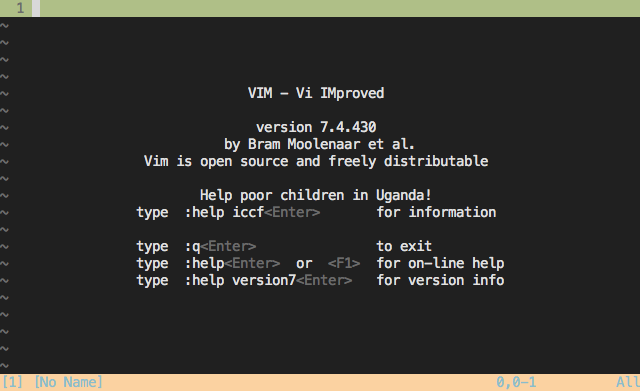
If your Vim looks like the above image you are using a 256 terminal theme without setting let base16colorspace=256 in your ~/.vimrc. Either set let base16colorspace=256 in your ~/.vimrc or use a non 256 terminal theme.
Blue line numbers
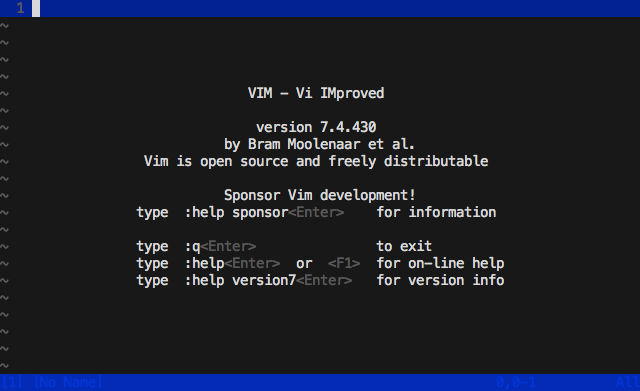
If your Vim looks like the above image you are setting let base16colorspace=256 in your ~/.vimrc but either not running Base16 Shell or Base16 Shell is not working for your terminal. Either ensure Base16 Shell is working by running the colortest available in the Base16 Shell repository or not setting let base16colorspace=256 in your ~/.vimrc.